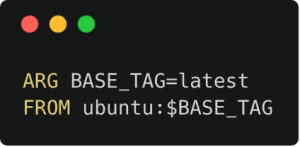

Hadolint is the Dockerfile linter most guides recommend, and it still waves through a latest tag hidden behind an ARG.
I know Hadolint well. When I started my own Docker and Kubernetes linter for JetBrains IDEs, I read its rule definitions one by one and then its GitHub issues, because users who take time to report a problem show you what the tool can’t do. That research ended up as the Cloud (IaC) Security plugin, which now covers many of Hadolint’s rules, written in Kotlin on top of the IDE’s own Dockerfile model.
So this is a biased comparison, and I say it up front. The two tools solve different parts of the job, and many teams need both.
What Hadolint is
Hadolint is a command line linter for Dockerfiles, written in Haskell. It parses the Dockerfile into a syntax tree and checks it against rules with DL codes. It also hands every RUN instruction to ShellCheck, so you get shell warnings (SC codes) on top of the Dockerfile ones.
Run it:
hadolint Dockerfile
docker run --rm -i hadolint/hadolint < Dockerfile
A few rules you will meet in the first week:
| Rule | What it flags |
|---|---|
| DL3006 | Image without an explicit tag |
| DL3007 | Image with the latest tag |
| DL3008 | apt-get install without pinned versions |
| DL3015 | apt-get install without --no-install-recommends |
| DL3027 | apt instead of apt-get |
| DL3003 | cd instead of WORKDIR |
| DL3042 | pip install without --no-cache-dir |
To silence a rule for one instruction, put a comment above it. For the whole project, list it in a config file:
# hadolint ignore=DL3008
RUN apt-get update && apt-get install -y --no-install-recommends curl
# .hadolint.yaml
ignored:
- DL3008Output formats cover JSON, SARIF, Checkstyle, Code Climate and a few more, so it fits into almost any CI. There is an official GitHub Action too.
Where Hadolint stops
It sees only Dockerfiles. Docker Compose files and Kubernetes manifests are out of scope. A privileged pod or a hostPath volume needs a second tool.
It runs after you write the code. Hadolint works on the command line and in CI. In IntelliJ IDEA you can wire it up as an external tool, and the feedback comes only when you run it.
Some gaps stay open. When I read the issues, one that stuck with me was variables in FROM. Hadolint checks the text of the tag, and it doesn’t resolve the ARG behind it (an open issue shows the same blind spot):
ARG BASE_TAG=latest
FROM ubuntu:$BASE_TAG
The image is ubuntu:latest, but the linter sees a tag and moves on. The project looked close to abandoned when I did my research.
What the IntelliJ plugin does differently
The Cloud (IaC) Security plugin runs inside IntelliJ IDEA and the other JetBrains IDEs (PyCharm and WebStorm among them) as a set of inspections. The difference you feel first: the warning shows up on the line while you type, sometimes with a quick fix next to it.
Dockerfiles. Base image tags (the variable resolved, so the example above gets flagged), running as root, sudo, package manager caches for apk, dnf, yum, zypper and pip, ADD instead of COPY, an exposed SSH port and ports out of range, duplicate CMD, ENTRYPOINT, HEALTHCHECK instructions and stage aliases, secrets in ENV, curl piped to bash.
Docker Compose. Image tags, the root user, an exposed SSH port and privileged mode.
Kubernetes manifests. Privileged containers, host network, PID and IPC namespaces, hostPath volumes, host ports, added capabilities, seccomp, AppArmor and SELinux overrides, unsafe sysctls, proc mount, containers that can run as root.
Every rule has a page. Each inspection links to an explanation with a bad and a fixed example, for instance apt vs apt-get or a single HEALTHCHECK per stage.
CI. The same inspections run in Qodana, so the IDE and the pipeline agree on what is a problem.
What it doesn’t do: it doesn’t run ShellCheck on your RUN scripts, and it lives in JetBrains IDEs, so a VS Code user won’t get it.
Hadolint vs the plugin, side by side
| Hadolint | Cloud (IaC) Security | |
|---|---|---|
| Where it runs | CLI, Docker image, CI | JetBrains IDEs, Qodana in CI |
| When you see a problem | When you run it | While you type |
| Dockerfile rules | Yes, DL codes | Yes, many Hadolint rules plus Trivy checks |
Shell checks in RUN | Yes, through ShellCheck | No |
| Docker Compose files | No | Yes |
| Kubernetes manifests | No | Yes |
ARG in FROM resolved | No | Yes |
| Quick fixes | No | For some rules |
Which one to use
If your team works in IntelliJ IDEA, install the plugin for the feedback while you write, and keep Hadolint in CI if you want ShellCheck on your RUN lines. They don’t fight each other: the plugin’s Dockerfile rules come from Hadolint and Trivy.
If you edit Dockerfiles in another editor, Hadolint in CI is the minimum. Add a separate scanner for your Kubernetes manifests.
If you have one Dockerfile and nobody reviews it, either tool beats nothing. Most of the problems both tools catch are small, until the image with latest and a root user ends up in production.
Which Dockerfile linter runs in your pipeline today, and did it ever catch something that would have hurt?
At the end
If you like this post, follow me on LinkedIn to get new articles about Docker and Kubernetes security. Every rule of the plugin has its own page in Infrastructure security.
Found this useful? Follow me on social media to stay updated.
